TL;DR: A Weekly Rank Tracking Report Template for Teams helps Amazon sellers monitor product rankings, analyze performance trends, and collaborate efficiently across departments. This guide includes a customizable template, key metrics to track, and best practices for improving sales through data-driven teamwork.
Key Takeaways
- A Weekly Rank Tracking Report Template streamlines performance monitoring and enhances team alignment on Amazon sales goals.
- Essential metrics include keyword ranking position, Buy Box ownership, conversion rate, sales velocity, and competitor benchmarking.
- Effective templates support collaboration between marketing, operations, and analytics teams with clear visualizations and action items.
- You can automate data collection using tools like SellerSprite’s Amazon rank tracking features to reduce manual reporting time by up to 80%.
- Regular review of rank reports helps identify optimization opportunities in content, pricing, and advertising strategy.
Table of Contents
Note on marketplaces: This guide is specifically optimized for the US market.
Why Weekly Rank Tracking Matters for Amazon Teams
For Amazon sellers—especially growing brands and teams managing multiple SKUs—consistently monitoring product performance isn't just helpful; it's essential. One of the most powerful tools at your disposal is the Weekly Rank Tracking Report. Unlike daily fluctuations that can mislead or overwhelm, weekly reports offer a balanced view of trends, allowing teams to make informed decisions without reacting to noise.
Rank tracking refers to monitoring where your products appear in Amazon search results for specific keywords. Your position directly impacts visibility, click-through rates, and ultimately, sales. But when you're part of a team—whether it's marketing, operations, or executive leadership—everyone needs access to the same reliable data. That’s where a standardized Weekly Rank Tracking Report Template for Teams becomes invaluable.
Imagine this scenario: Your PPC manager notices a drop in ad performance, but without knowing whether organic rankings have also declined, they might misattribute the issue to bidding strategy. Meanwhile, your content team could be unaware that a top-performing keyword has slipped from position #3 to #12, signaling a need for listing optimization. A unified report bridges these gaps.
This kind of transparency fosters accountability and alignment. It ensures that everyone—from the new seller learning the ropes to the brand manager overseeing a portfolio of 50+ products—has a shared understanding of what’s working and what needs attention.
Moreover, regular reporting builds a culture of continuous improvement. Instead of waiting for monthly reviews or crisis-driven interventions, teams can proactively adjust strategies each week based on real data. This agility is especially critical in competitive niches where small changes in ranking can mean the difference between profitability and stagnation.

Core Components of an Effective Rank Tracking Report
A high-impact Weekly Rank Tracking Report isn’t just a spreadsheet of numbers—it’s a strategic document designed to inform action. To be effective, it should include several core components that cover both quantitative performance and qualitative insights.
1. Executive Summary (Top-Level Insights)
Start with a summary highlighting key wins, losses, and urgent actions. This section is especially important for managers and executives who may not dive into every detail. For example:
- "Product A moved from #7 to #2 for 'organic dog treats'—consider increasing ad spend."
- "Three core keywords dropped out of the top 10—urgent content refresh needed."
- "Buy Box ownership decreased from 92% to 76%—check pricing vs. competitors."
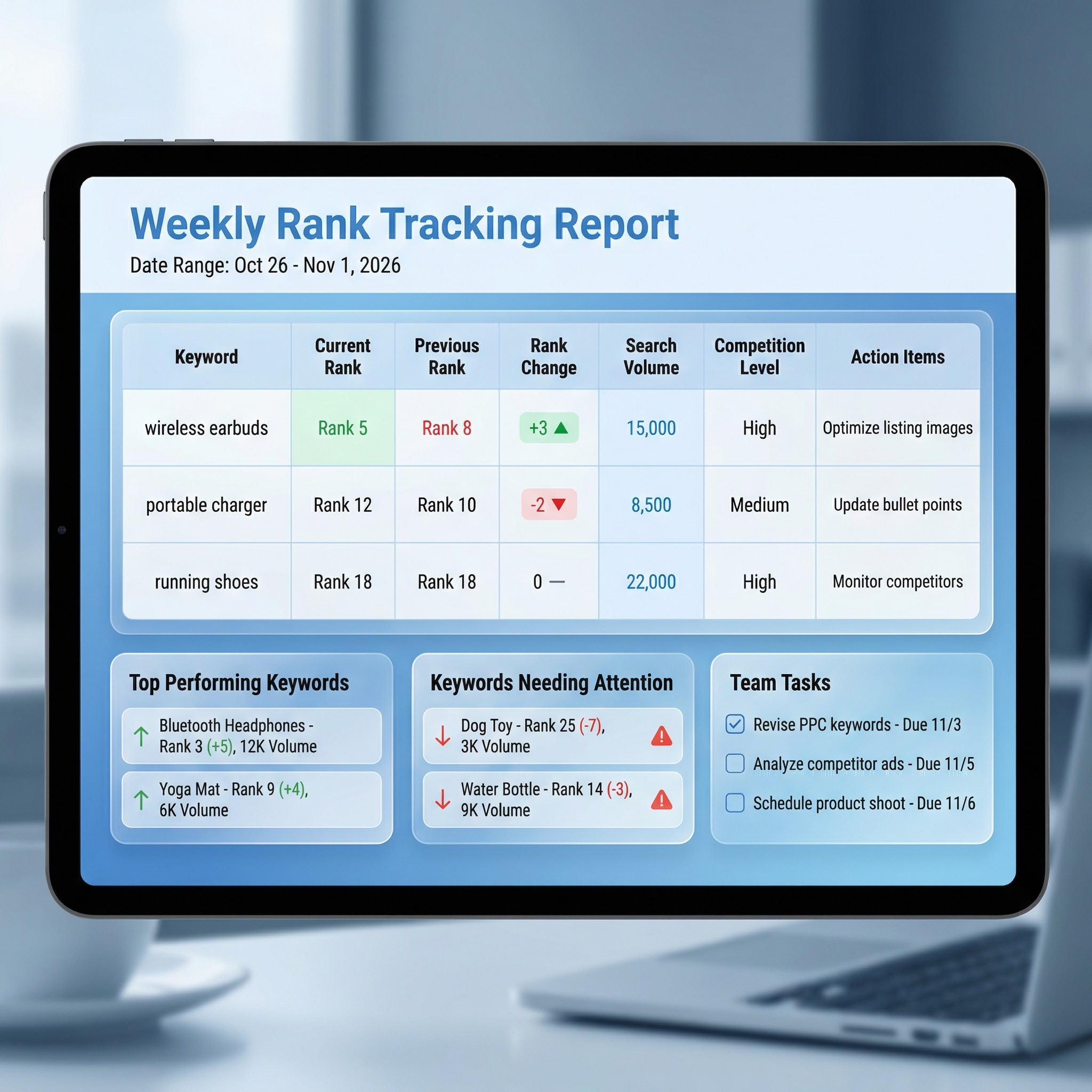
2. Keyword Ranking Performance Table
This is the heart of the report. List your target keywords along with:
- Current rank (this week)
- Prior week’s rank
- Change (↑ or ↓)
- Search volume (optional)
- Difficulty score (optional)
- Target position (e.g., top 3, top 10)
Use conditional formatting (e.g., green for improvement, red for decline) to make trends instantly visible.
3. Sales & Conversion Metrics
Ranking alone doesn’t tell the full story. Pair it with sales data:
- Units sold (this week vs. last week)
- Conversion rate (CVR)
- Click-through rate (CTR) from search
- Revenue generated
This helps determine whether improved rankings are translating into actual sales—or if other factors (like pricing or reviews) are holding you back.
4. Buy Box Ownership & Pricing Analysis
Winning the Buy Box is crucial for sales velocity. Track:
- Percentage of time in Buy Box
- Average price compared to FBA competitors
- Shipping speed and fulfillment method
If your Buy Box share drops, investigate whether a competitor lowered their price or improved delivery times. Learn more about how to win the Buy Box with proven strategies.
5. Competitor Benchmarking
Include a side-by-side comparison with 2–3 key competitors. Track:
- Their ranking for your shared keywords
- Pricing changes
- New product launches
- Review velocity and ratings
This helps you stay ahead of market shifts. For deeper insights, use competitor analysis tools to reverse-engineer successful listings.
6. Action Items & Owner Assignments
Every report should end with clear next steps. For example:
- Content Team: Optimize title and bullet points for “eco-friendly water bottle” (currently ranked #14).
- Ads Team: Increase bid on high-intent keyword “BPA-free shaker bottle” showing strong CTR.
- Operations: Replenish inventory for Product X—sales up 40% this week.
Step-by-Step: Building Your Weekly Rank Tracking Report Template
Creating a repeatable, scalable template ensures consistency across weeks and team members. Follow this step-by-step process to build your own Weekly Rank Tracking Report Template for Teams.
Step 1: Define Your Goals and KPIs
Before building the template, clarify what you want to achieve. Are you focused on:
- Improving organic visibility?
- Increasing conversion rates?
- Outranking a specific competitor?
Your goals will determine which metrics to prioritize. For example, if your goal is visibility, focus on keyword rankings and impressions. If it’s sales, emphasize conversion rate and Buy Box ownership.
Step 2: Select Target Keywords
Choose 10–20 high-value keywords per product. Use tools like SellerSprite’s Keyword Research to find terms with strong search volume and relevance. Categorize them by intent:
- Informational: "How to clean silicone straw."
- Commercial: "best insulated coffee cup 2024."
- Transactional: "Buy a double-wall tumbler cheap."
Step 3: Set Up Data Collection
Manually checking rankings is time-consuming and error-prone. Automate data collection using:
- SellerSprite’s Rank Tracker: Monitors daily keyword positions and compiles weekly summaries.
- Amazon Brand Analytics (ABA): Provides search term frequency and conversion data.
- Helium 10 or Jungle Scout: Alternative tools with rank tracking capabilities.
Integrate these into Google Sheets or Excel using APIs or CSV exports for seamless reporting.
Step 4: Design the Report Layout
Use a clean, professional layout. Recommended sections:
- Cover page with date, team name, and report period
- Executive summary (1 paragraph + 3 bullet points)
- Keyword ranking table (sortable and filterable)
- Sales & conversion dashboard (charts preferred)
- Competitor comparison matrix
- Action items table with owner and due date
Step 5: Automate and Share
Once your template is built, automate delivery:
- Schedule weekly exports from your rank tracking tool
- Use Google Sheets + email triggers or Microsoft Power Automate
- Share via Slack, email, or team collaboration platforms like Notion or ClickUp
Ensure all stakeholders receive the report every Monday morning with time to act during the week.
Team Collaboration Strategies Using Rank Reports
A report is only as valuable as the actions it inspires. To maximize impact, integrate your Weekly Rank Tracking Report into team workflows.
Hold Weekly Performance Meetings
Dedicate 30–60 minutes each week to reviewing the report as a team. Structure the meeting around:
- What improved? (Celebrate wins)
- What declined? (Diagnose causes)
- What’s next? (Assign actions)
Use screen sharing to walk through the data. Encourage input from all roles—customer service might notice recurring complaints affecting reviews, while logistics can flag stockouts impacting sales velocity.
Use Shared Dashboards for Transparency
Move beyond static PDFs. Create a live dashboard using:
- Google Data Studio
- Microsoft Power BI
- Notion databases with linked metrics
These allow real-time updates and role-based views. Marketing sees ad performance, operations sees inventory levels, and leadership sees overall health.
Link Reports to Broader Business Goals
Connect weekly rankings to quarterly objectives. For example:
- If the Q2 goal is 20% revenue growth, track whether top keywords are trending upward.
- If expanding into new categories, monitor ranking progress for entry-level products.
This aligns day-to-day efforts with long-term vision.
t
Free Downloadable Weekly Rank Tracking Report Template
To help you get started immediately, we’ve created a free, customizable Weekly Rank Tracking Report Template designed specifically for Amazon seller teams.
✅ What’s included:
- Pre-built Google Sheets template with auto-calculating formulas
- Keyword tracking sheet with color-coded trends
- Sales & conversion dashboard with charts
- Competitor comparison table
- Action items log with assignees and deadlines
📥 How to get it:
- Visit our signup page
- Create a free SellerSprite account
- Access the template in the “Resources” section
💡 Pro Tip: Pair this template with competitor storefront tracking to anticipate market shifts and generate new product ideas based on trending launches.
This template eliminates hours of manual work and ensures your team stays aligned, agile, and data-driven.
FAQ
What should be included in a weekly rank tracking report for Amazon seller teams?
A comprehensive weekly rank tracking report should include: 1) Executive summary of key changes, 2) Keyword ranking performance (current vs. previous week), 3) Sales and conversion metrics (units sold, CVR, revenue), 4) Buy Box ownership rate, 5) Competitor benchmarking, and 6) Action items with assigned owners. Visual elements like charts and color coding improve readability and decision-making speed.
How can teams use a rank tracking report template to improve Amazon sales performance?
Teams can use the template to identify trends, assign responsibilities, and align strategies across departments. For example, if keyword rankings drop, the content team can optimize listings; if conversion rates decline, the ads team can adjust targeting. Regular review fosters accountability and enables proactive adjustments, leading to improved visibility, higher conversion rates, and increased sales over time.
Are there free downloadable weekly rank tracking report templates for Amazon sellers?
Yes! SellerSprite offers a free, customizable Weekly Rank Tracking Report Template for Amazon seller teams. It includes pre-built sheets for keyword tracking, sales performance, competitor analysis, and action items. To download, simply create a free account at https://www.sellersprite.ai/en/w/user/signup and access it in the Resources section.
Can I automate data collection for my rank tracking report?
Absolutely. Tools like SellerSprite automatically track your keyword rankings daily and export data to CSV or Google Sheets. You can set up automated reports that populate your template each week, reducing manual effort by up to 80%. This ensures accuracy and frees up time for strategic analysis.
How often should Amazon teams review rank tracking reports?
Weekly reviews are ideal for most Amazon seller teams. This frequency balances timely insights with practical workload. Daily tracking is useful for high-velocity products or during product launches, while monthly reviews may miss critical trends. A weekly cadence supports consistent optimization and team alignment.
Next Steps
- Download the free Weekly Rank Tracking Report Template by signing up for a SellerSprite account.
- Customize the template with your product portfolio and target keywords.
- Schedule your first team review meeting to establish a data-driven culture.
References
- Amazon A9 Algorithm Overview View
- How to Win the Buy Box on Amazon View
- Competitor Analysis Framework for Amazon Sellers View
- Tracking Competitor Storefronts for Product Ideas View
By SellerSprite Success Team
The SellerSprite Success Team combines deep expertise in Amazon marketplace dynamics, data analytics, and e-commerce operations. With years of experience supporting thousands of sellers—from beginners to enterprise brands—we deliver actionable insights grounded in real-world performance. Our content is built on extensive testing, customer feedback, and continuous research into Amazon algorithm updates and competitive strategies.


